How Can We Help You Today?
Equipment Finance & Leasing Quote Calculator
Turn your equipment price into clear monthly and weekly finance options for your customer.
Then create a customer quote, copy a proposal table or send the enquiry directly to eLeasing.
Enter the total selling price of the equipment excluding GST. Example: enter 25000 for $25,000.
Compare indicative monthly and weekly finance and leasing payments across 12 to 60 months. All payments are shown excluding GST and in arrears.
Print a pricing summary, create a customer quote, copy a proposal table or send the opportunity to eLeasing. Choose only the option you need.
Optional Supplier Logo for Printed Quotes
Upload your company logo to replace the eLeasing logo on printed pricing summaries and full customer quotes. Leave this blank to keep the eLeasing logo. PNG, JPG, JPEG and WebP files are accepted.
The eLeasing logo will be used unless a supplier logo is uploaded.
• Payments shown exclude GST.
• Subject to eLeasing and/or funder approval, standard terms and conditions, and credit and risk criteria being met.
• Quotes are valid for 14 days.
• Any quote may change if the assumptions used by eLeasing and/or a funder partner change.
Send a Customer Finance Enquiry to eLeasing
Add the customer and equipment details below, then click send. A ready-to-send email will open with the equipment price and all calculated payment options so eLeasing can contact the customer and begin the finance approval process.
Use this if the main email button opens Apple Mail or Outlook instead of Gmail.
Create a Professional Customer Finance & Lease Quote
Use this if the main email button opens Apple Mail or Outlook instead of Gmail.
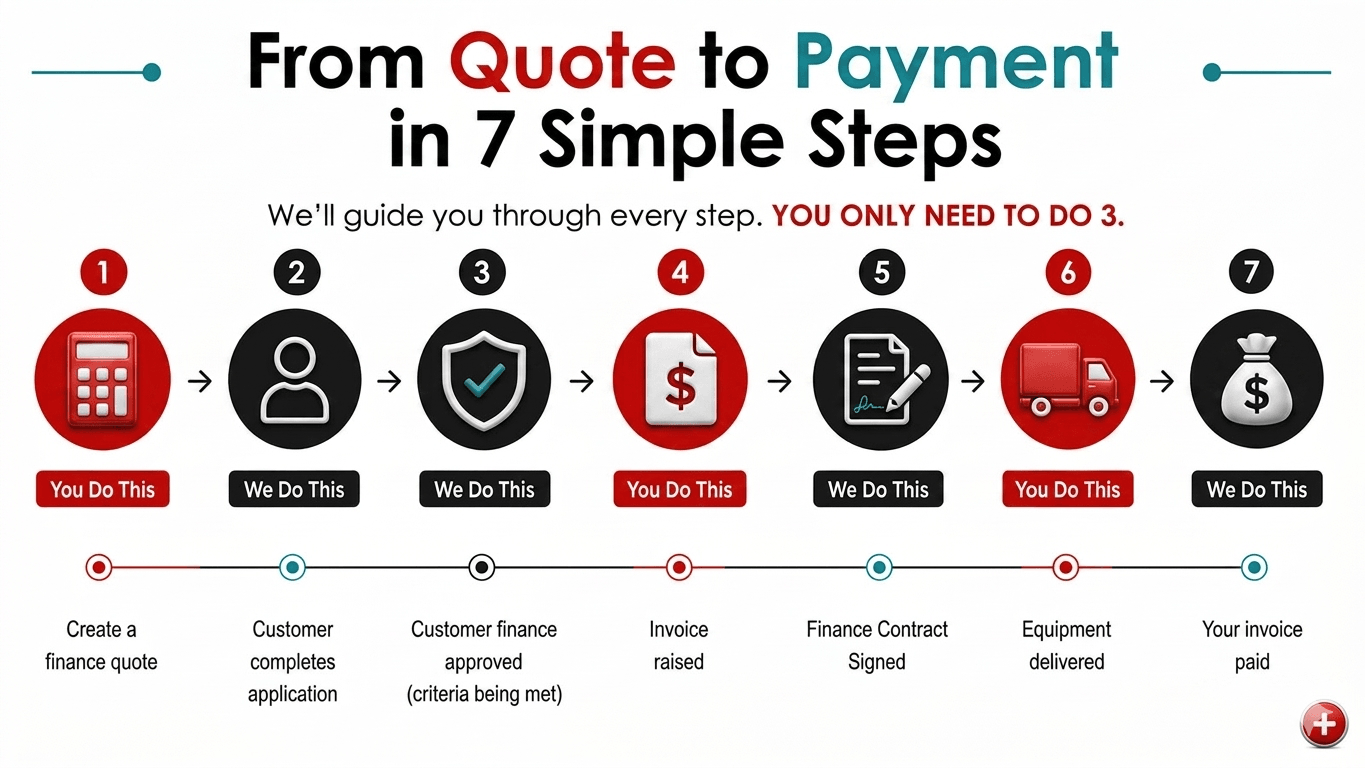
A Simple Finance Process That Helps You Sell More
Only 3 simple steps for you.
We manage the entire finance process.
Minimal administration.
Fast payment once delivered.
Customers receive a simple, professional experience.
Increase your sales with confidence.
New to eLeasing? Let’s Work Together
Sell equipment, vehicles or other commercial assets and want to offer finance or leasing to your customers? Complete the form below to introduce your business. We will learn about what you sell, the customers you work with and how eLeasing could help you present professional payment options and increase sales.
Payment to Equipment Cost Calculator
Enter the monthly or weekly payment your customer wants to pay (excluding GST), and we'll instantly estimate the equipment cost they could finance over 12, 24, 36, 48 or 60 months.
Enter the payment amount your customer wants to pay, then choose whether it is a monthly or weekly payment. Example: type 500 for $500.
Compare the estimated equipment cost available for each term. Results show the estimated equipment cost ex GST, plus the monthly and weekly payment comparison.
Choose the output that suits your customer conversation. You do not need to complete every option.
• Estimated equipment costs and payments shown exclude GST.
• Subject to eLeasing and/or funder approval, standard terms and conditions, and credit and risk criteria being met.
• Quotes are valid for 14 days.
• Any quote may change if the assumptions used by eLeasing and/or a funder partner change.
Send Quote Details to eLeasing
Complete these details and click send. Your email will be populated with the customer details, payment entered and all estimated equipment cost options so Doug can contact the customer and start the approval process.
Use this if the main email button opens Apple Mail or Outlook instead of Gmail.
Create a Professional Customer Finance & Lease Quote
Use this if the main email button opens Apple Mail or Outlook instead of Gmail.
Supplier Questions & Answers
Why Offer Equipment Finance to Your Customers?
Offering finance or leasing can remove one of the biggest barriers to completing an equipment sale: the upfront purchase price. By presenting clear monthly or weekly payment options, you can help customers acquire the equipment they need sooner, preserve their working capital and consider higher-value or additional equipment. This can improve sales conversions while giving customers greater purchasing flexibility.
How eLeasing Supports Equipment Suppliers
eLeasing works alongside equipment suppliers throughout New Zealand. We provide professional quote calculators, customer quotation tools and direct support throughout the finance process. You remain focused on selling your products while we help your customer with the application, approval, documentation and settlement process i.e. you can:
Create indicative payment options in seconds.
Produce professional customer quotations.
Send customer opportunities directly to eLeasing.
Receive support from application through to settlement.
Equipment and Business Assets We Can Finance
We arrange finance and leasing for a wide range of commercial equipment, vehicles and business assets, including machinery, medical equipment, IT and software, office equipment, hospitality equipment, manufacturing equipment, agricultural and construction equipment, fitness equipment, security systems, renewable energy equipment, portable buildings, furniture and many other productive business assets.
Customers and Organisations We Assist
Your customers may include established or newer businesses, companies, sole traders, government departments, local authorities, schools, universities, tertiary providers, healthcare organisations, charities, trusts, not-for-profit organisations and other eligible New Zealand organisations. Every application remains subject to the relevant credit and approval criteria.
Commercial Finance Options Available
Depending on the customer, equipment and transaction, eLeasing can arrange Business Rental Agreements, Finance Leases, Commercial Loans, Vehicle Finance, Sale and Lease Back facilities and other suitable commercial finance solutions. Available terms and payment frequencies depend on the customer’s circumstances and the applicable funder criteria.
Simple Finance Process
Our streamlined process makes equipment finance straightforward for both suppliers and customers. Once the equipment has been selected, we assist with the finance application, obtain approval where possible, prepare documentation and coordinate settlement so equipment can be delivered promptly.
No Finance Experience Required
You don't need to become a finance expert. We provide ongoing support, answer customer finance questions and guide you through the entire process. Your role remains selling equipment while we handle the finance.
Trusted by New Zealand Suppliers
For more than 20 years, eLeasing has helped suppliers throughout New Zealand provide commercial equipment finance solutions for their customers. Our experience across multiple industries allows us to deliver practical finance solutions with personalised service.
Frequently Asked Questions (FAQs)
How can offering equipment finance help increase my sales?
Offering equipment finance gives customers another way to purchase your products without paying the full amount upfront. By spreading the cost over regular repayments, customers can often purchase sooner, upgrade to better equipment or buy additional products, helping increase your sales and conversion rates.
What types of equipment can eLeasing finance?
We arrange finance for a wide range of commercial equipment and business assets including vehicles, machinery, medical equipment, construction equipment, agricultural equipment, manufacturing machinery, office equipment, IT hardware, software, security systems, hospitality equipment, gym equipment, renewable energy systems, furniture and many other business assets.
Do I need finance experience to offer finance to my customers?
No. You don't need any finance experience. eLeasing provides the finance expertise while you continue doing what you do best—selling your products and services. We support you throughout the process and assist with customer enquiries when required.
How do I generate finance quotations for my customers?
Our online quote calculators allow you to prepare professional finance quotations in seconds. Simply enter the equipment cost, select the preferred payment frequency and the calculator will produce repayment options that can be printed, copied or emailed.
Can customers choose monthly or weekly repayments?
Yes. Depending on the finance solution, customers can often choose monthly or weekly repayments to better suit their cash flow and business needs.
What finance terms are available?
Finance terms vary depending on the equipment, customer and finance provider. We can often arrange flexible terms to suit the customer's business requirements while ensuring repayments remain affordable.
What finance products does eLeasing offer?
We can arrange a range of commercial finance solutions including Business Rental Agreements, Finance Leases, Commercial Loans, Vehicle Finance, Sale and Lease Back facilities and other commercial finance products, depending on the customer's requirements.
Does eLeasing deal directly with my customer?
Yes. With your knowledge and involvement where appropriate, we work directly with your customer to guide them through the finance process, answer finance questions, prepare documentation and coordinate settlement. This saves you time while helping provide a professional customer experience.
Will I still control the customer relationship?
Absolutely. You continue to own the sales relationship with your customer. Our role is to assist with the finance process while supporting both you and your customer from application through to settlement.
How quickly can finance applications be approved?
Approval times vary depending on the customer's circumstances, the information provided and the finance provider. Many applications can be assessed promptly, allowing equipment orders to proceed as quickly as possible.
Can existing businesses and new businesses apply?
Yes. We assist established businesses as well as many newer businesses, subject to normal lending criteria and credit assessment.
Can government organisations, schools and charities obtain finance?
Yes. We regularly assist businesses, government departments, local authorities, schools, universities, tertiary institutions, healthcare providers, charities, trusts and many other organisations throughout New Zealand.
Is there a minimum or maximum equipment value?
Finance limits vary depending on the finance provider and the customer's circumstances. We are happy to discuss equipment values ranging from smaller business purchases through to significant commercial equipment investments.
Do you work with suppliers throughout New Zealand?
Yes. eLeasing works with suppliers and customers nationwide, providing commercial equipment finance solutions across both the North Island and South Island.
Why should I partner with eLeasing?
With more than 20 years of experience in commercial equipment finance, eLeasing provides suppliers with professional finance calculators, responsive service, experienced finance specialists and access to a range of commercial finance solutions designed to help increase equipment sales.
Is there any obligation to become a supplier partner?
No. There is no obligation. We're happy to discuss how our supplier programme works, answer your questions and help you decide whether offering finance is the right fit for your business.
How do I become an eLeasing supplier?
Simply contact us or complete the enquiry form on this page. We'll discuss your business, the products you sell and how we can help you start offering equipment finance and leasing to your customers.
Copyright
© 2026 eLeasing Limited. All rights reserved. The content, branding, calculators, website code, graphics and website design are protected by copyright. Unauthorised reproduction, copying, distribution or commercial use without prior written permission from eLeasing Limited is prohibited.
